Deploying node.js/mongodb app on heroku and mongolab

Ok, in my rare downtime at work I’ve decided to put together a quick test app that uses node.js and mongo.

For starters, here’s an excellent resource on node: http://howtonode.org

And a great tutorial on getting started with your first node.js app: http://howtonode.org/express-mongodb

This tutorial covers the app setup, first locally with memory storage, then locally with mongo DB. It also briefly notes the use of Express (node.js framework) and Jade (that allows you to create quick HTML templates, similar to haml for Ruby).

What it doesn’t cover, is deployment of your app into the real world – the internets! The choice of hosting is obvious – heroku provides the best platform out there (in my opinion) for easy deployment of apps (they started with ruby and now are node.js compatible, with their most recent cedar stack).

To get your heroku environment setup, follow this excellent walkthrough: https://devcenter.heroku.com/articles/nodejs
Follow it up until the Postgres part – we will actually need to setup Mongo.

For running Mongo, heroku offers an add-on that you can use for your apps through MongoLab. And the setup is just as easy and straightforward: https://devcenter.heroku.com/articles/mongolab

Remember that you need your MONGOLAB_URI in order to connect your app to your Mongo database hosted on Mongolab.


$ heroku config | grep MONGOLAB_URI
MONGOLAB_URI => mongodb://heroku_app1234:random_password@dbh00.mongolab.com:27007/heroku_app1234

Now, to the interesting part: how to update your app to work on heroku.

We need to update 2 things.

1) Port. Locally, your node.js server was listening on port 3000. With heroku, it will be a different port every time, and to find out the actual port we will make use of the environment variable that’s available:

process.env.PORT

So at the bottom of your app.js file, switch this:


app.listen(3000);

To this:


var port = process.env.PORT || 3000;
app.listen(port, function() {
console.log("Listening on " + port);
});

2) Database connection string. This is a little bit more involved and I had to comb through multiple resources to actually get this to work.
Instead of using multiple variable to define Mongo (db, server, bson, connection and object) we will use “connect” – a package that simplifies that for us.

So replace the top part of your article.js file, by updating this:


var Db = require('mongodb').Db;
var Connection = require('mongodb').Connection;
var Server = require('mongodb').Server;
var BSON = require('mongodb').BSON;
var ObjectID = require('mongodb').ObjectID;

ArticleProvider = function(host, port) {
this.db= new Db('node-mongo-blog', new Server(host, port, {auto_reconnect: true}, {}));
this.db.open(function(){});
};

To this:


var mongostr = YOUR_MONGOLAB_URI_VALUE
var localstr = "mongodb://localhost/node-mongo-blog";

var connect = require('connect');
var mongo = require('mongodb');
var database = null;

ArticleProvider = function() {

mongo.connect(mongostr, {}, function(error, db){
console.log("connected, db: " + db);

database = db;

database.addListener("error", function(error){
console.log("Error connecting to MongoLab");

});
});
};

Note the separation of database into a global variable. Using “this.db” gave me issues (database was coming up “null” or “undefined”)

Final notes:

– In your package.json file make sure you list new dependencies (mongo and connect):


"dependencies": {
"express": "2.5.8",
"jade": ">= 0.0.1",
"stylus": ">= 0.0.1",
"mongodb": ">= 0.9.6-7",
"connect": "1.8.5"
},

– Heroku has a nice interface where you can manage add-ons, so you can manage your MongoLab db right from there. Just click on My Apps -> [name of the app] -> Add-Ons, and select MongoLab

Find the source code on git here: https://github.com/ntanya/exptest.git

Mongo meetup april: quick notes

Excellent mongo meetup again – their meetups are always informative and have good presenters, today all three were great.

1) Custom shard balancer from GameChanger
2) Mongolian – node.js driver for mongo by Marcello
3) Variety – schema analyzer for mongo by James Cropcho

I especially enjoyed Marcello’s and James’ presentations, because both of them are so passionate about what they do and defy the awesomeness of NYC tech scene today: take a NYC-made product and make it better, and open source too. I took James’ ruby class a couple of weeks ago and it was great as well, his easy and engaging manner of speaking and unusual fashion sense just draw attention – highly recommended.

Shard balancer demo was very cool as well, but seemed to solve kind of a custom problem, which wouldn’t apply to as many mongo users as the other two.

Shard balancer (python): https://github.com/gamechanger/presplit
Variety: https://github.com/JamesCropcho/variety
Mongolian:https://github.com/marcello3d/node-mongolian

Hosting update: problem resolved

Well, of course it turned to be that hosting was not an issue. Someone found a hole in one of the test sites I’ve had there and sneaked in a pretty interesting script, in Chinese! I had a good laugh once I found it: chinese script injecting redirects to Russian sites, pretty darn cool, isn’t it.

So after I’ve removed all suspicious files and the script in question, everything came back to normal. Phew!

And it was a good time to tidy things up anyways, so all’s well that ends well!

In search of new hosting

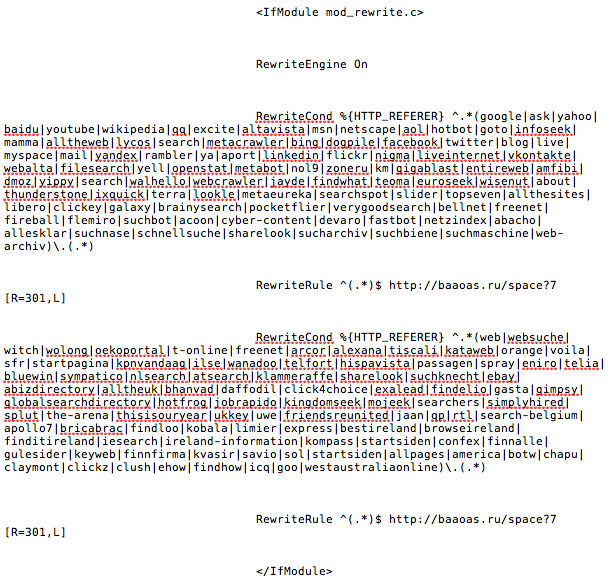
I’ve been staying on the same hosting provider for years now just because it’s cheap, worked OK, and there was no real need to change it. However, big disappointment – something that I just discovered by chance: all htaccess files were hijacked and a bunch of weird redirects were added to the top and bottom of each file. The site would load fine, but you see a lot of traffic going to some shady Russian site (duh, not surprising, and I’m from Russia) before it actually loads.

So I spent the past 20-30 mins removing that junk, only to discover that shady redirects were still going on. Then I looked into the root web directory, and there I found a non-previously-existent master htaccess file with same traffic going to basooo dot ru. WTF! Not only existing files were compromised, but also a new files were inserted as well.

Moving off hostmonster ASAP. Screenshot of the shady stuff: https://tanyanam.com/wp-content/uploads/2012/04/screen-shot-2012-04-13-at-11-28-07-pm.png

Learning Ruby

A couple of weeks ago I stumbled upon classes offered at General Assembly, and one of them was a 3-hour class on Ruby. So of course I had to sign up!

I don’t necessarily want to become a Ruby developer, but I’ve always wanted to at least know the basics and how it works and if it’s really as easy as they say to get up and running with a ruby/rails powered web app.

So what’s the answer? The short answer is: it is fairly easy to get the gist of it and put together a quick prototype. Gotchas: lots of things to install, and with any language, you have to know what you’re doing (things such as MVC, database schema design, version control, etc.)

Overall, it was a great experience! I loved that the class was full (30 people), close to 1/3 of them were ladies, and the instructor (James Cropcho) gave us plenty of hands-on time and was available to answer all questions (and chewed like 25 pieces of gum during the course of the class).

Will definitely be checking out more Glasses at General Assembly – highly recommended.

Review of SXSW 2012

Austin, TX
March 9 – March 11, 2012

Everyone and their grandma already knows what the conference is about. Some bits I’ve heard: “spring break for nerds”, “pure awesomeness”, “if you’re a somebody in tech industry you have to be there”. All of those are true. But the conference is VERY popular, so be prepared to navigate your way through crowds and have stamina for days of learning and socializing and nights of partying.

This is a view from a first-time attendee, so please be kind and don’t stone me for some missed facts and parties that I didn’t catch (“You didnt’ see Jay-Z?! You loser!”).

When to arrive and when to leave

I’ve arrived to the beautiful cold and rainy city of Austin on Friday afternoon. That turned out to be a good day to arrive (a lot of people did), since the evening events were starting on that day, and it preluded the fun-filled weekend. I would suggest spending 4 days (Fri – Mon), to accommodate your day job (you only need 2 days off) and also get the most out of the conference. I really wished I stayed through Monday, but damn this day job, it didn’t happen. I know people who stayed longer, 5 days to a week, and they were pretty burned out by the time they returned. You can only do so many late nights of drinking in a row (if you can do more than 3 in a row, consider yourself my new hero).

What to bring

Yourself, energetic, friendly and ready to have a great time. I was in a shitty mood when I got there (fk work), but arriving in a new place excites me beyond reason and I got over it. Austin is fun, so be ready to have fun!

Comfy shoes. A cool pair of sneaks will work just fine. Water bottle. Phone charger. I’d recommend a small camera other than the one on the phone, to save battery and get better pix. Sunscreen. 2012 attendees: an umbrella and rain poncho. Others – disregard. It never rained in Austin like it did this year and it never will.

What is not needed: tshirts and shades – plenty of that stuff going around, so if you plan to rock jeans+tshirt look, you can arrive with your toothbrush, underwear and phone charger and be all set.

What to do first

At the airport, do a quick look for sponsored free rides. Fluent had a party bus this year picking people up and driving them to downtown Austin in style, with drinks, in a comfy big coach. There’s also a $1 shuttle to the city, it runs every 30 minutes.

After arrival, leave your bags at a hotel and catch a quick break. You have an option to head to the convention center and pick up badges, but beware – due to tremendous crowds this process can take more than an hour. I recommend getting badges early in the morning instead, the lines were much much shorter on Sat morning. Rather find yourself a happy hour to go to (you should have had one lined up before you landed, if you’re a somebody). I regretfully missed a vendor event due to the badge lines. Call this an early night, grab yummy dinner and go rest and get ready for the long day tomorrow.

The best place to stay btw, is Hilton, as it’s right next to the convention center. Other good ones are Omni, W, Marriott courtyard.

Catch me if you can

Once you get your badge, you’ll also receive a handy tote bag for your swag, and a schedule with info on all panels and locations. I did not plan anything in advance, just kind of picked them the day before and circled them in the brochure. There is about 5 time slots every day, and multiple tracks. I’d say pick a 2-3 that are the most interesting, mix them up, and spend the rest of the day outdoors exploring. There is a ton of snacking, drinking and fun and play options outside of convention center.

Note: popular speaker events tend to fill up quickly, so get there early. Frank Abignale talk was all filled up, so many people were turned down and had to go to this other panel one next door and catch a quick nap.

If you are with buddies, it’s much easier to move around in small groups of 2 or 3, otherwise it’s too cumbersome, unless you have one clear leader in a bunch of followers. There are apps like Sonar and Highlight that let you stalk each other, but honestly I didn’t wanna spend precious battery juice and did not use any. Speaking of juice, there are many recharging stations around, so look out for those. I’m a big believer that by next year some genius will solve the whole battery life issue and have the phones charged by sheer brainpower. There’s plenty of that stuff at South By!

There are free shuttles going around the campus, and also some gratis rides, like Twilio did this year, in case you’re not from New York and your poor legs are tired after a couple of hours running up and down convention center and 6th street. New Yorkers – high five!

Parties

Parties are awesome. This pretty much sums it up. Go to as many as possible, drink somewhat responsibly

Highlights this year

  • Running into Guy Kawasaki! Seeing Dwight from the Office!
  • Squarespace food truck with no lines in the rain, and eating hot dogs with some cool people
  • Google village, robots and schemers
  • Power of habits talk (albeit short), the author was very engaging and entertaining
  • Seeing a huge amount of work involved in attending the event as a company and sponsoring stuff and throwing parties. Parties are a lot of work – who knew?
  • Talking to strangers is awesome
  • Salt Lick BBQ shared with a stranger at the airport – good food, great conversation
  • $1 airport rides – should be instituted everywhere
  • Sunny day in Austin, after 2 days of pouring rain
  • Half hour of shopping on 2nd street before leaving Austin

Google Analytics: Set up multiple reports in one view

Just got a call from my account team asking me if there’s a way to create a report in Analytics that combines multiple views into one.

Initially, I thought of auto-emailing multiple reports, but it’s a hassle: we track 7 different Flash events for 7 brands, so imagine creating 1 summary report plus 7 brand reports and emailing those 8 files to someone on the team who would most likely need to re-jiggle the data into one big summary.

Turns out Google Analytics allows for a super efficient cool way to do this: put all reports into the Dashboard!

How to do this: when you are viewing the report that you’d like to see regularly, click on the Dashboard icon at the top (next to Export and Email icons). This will move this report to the Dashboard. Once you’re done, go back to the main screen (that is the Dashboard) and re-arrange your reports however you like.

Another helpful hint: you can then schedule your Dashboard report to be emailed to you as a PDF file (daily or every Monday).

Tada! Problem solved!