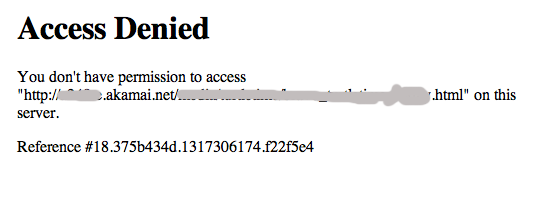
“Access denied” error on Facebook Apps

Facebook’s new requirement to have all tabs and apps working over HTTPS got my dev team working frantically on fixing all active apps.

One of the apps I manage is particularly interesting, because assets for the app are hosted on an Akamai server. Here’s how it is set up:

Facebook settings

And when I try point Facebook tab to the secure version of the file that lives on Akamai, the page throws the “Access denied” error:

What’s the reason? Well, apparently Facebook iFrame apps/tabs request content via POST (as opposed to GET). On most servers this works fine by default. In a case of Akamai, POST requests have to be enabled or configured manually. Once POST requests are allowed, the page content will load fine.

WordPress login issues with “reauth=1”

So, if you are like me and usually access your WordPress admin Dashboard by going to /wp-admin/, then you probably also have troubles with login not working. Mine stopped working with the latest version install (3.2.1).

What happens is /wp-admin/ redirects to wp-login.php with a bunch of parameters, the last one being “reauth=1”. If you look closely, you’ll notice that there’s also a redirect_to parameter, which should look like yoursite.com/wp-admin/. If you have your WordPress installed in a subdirectory, and not in the webroot, this redirect_to parameter might be set incorrectly. Thus – continuous loop from wp-login.php to /wp-admin/, and /wp-admin/ can not be found.

One way to get rid of this is to login from wp-login.php page directly. The other one is to tweak some WP settings. I’ll update the post once I know exactly what needs to be updated and where.

A helpful WP post on how to troubleshoot login issues: http://codex.wordpress.org/Login_Trouble

Uncaught SoapFault exception / Invalid parameters Error

I am using nusoap library to connect to Kintera API.  It worked fine on my other sites, but this one was giving me the following error message:

Fatal error: Uncaught SoapFault exception: [Client] SoapClient::SoapClient() [<a href=’soapclient.soapclient’>soapclient.soapclient</a>]: Invalid parameters in /test.php:147 Stack trace: #0 /test.php(147): SoapClient->SoapClient(‘KinteraConnect….’, true) #1 {main} thrown in /test.php on line 147

Line 147 has the following code:

$client = new soapclient($wsdl,true);

After reading up online a bit, it seems this error appears on PHP 5 servers because of class name conflicts. So I opened up nusoap.php file and figured that you could just use nusoap_client as a class name. Code piece from nusoap.php

if (!extension_loaded('soap')) {

/***    For backwards compatiblity, define soapclient unless the PHP SOAP extension is loaded.*/

class soapclient extends nusoap_client {

}

}

So I just went ahead and changed

$client = new soapclient($wsdl,true);

to

$client = new nusoap_client($wsdl,true);

and it fixed it.

Modifying Drupal download_count module to show files per user

Task:

  1. allow file downloads for only registered users in Drupal
  2. for admins, show download count for each file
  3. show which user downloaded which files

The download_count module is great for #1 and #2. However, it doesn’t save any information about users.

Here’s some modifications I’ve added to it to accomplish #3.

In the download_count.module file, find download_count_file_download() function. It saves the information about downloaded files into “file_downloads” table.

  • I created another similar table, called it “file_download_users” (columns: filename, user_id, timestamp) where I am going to save information about each download and keep user IDs.
  • Made sure I use global $user in this function
  • Insert the information about users into my new table:

db_query(“INSERT INTO {file_downloads_users} (filename, user_id, timestamp) VALUES (‘%s’, %d,%d)”, $filename, $user->uid, time());

Now I write my own hook_user function:

<?php/**

 * Implementation of hook_user()

 */


function download_count_user($op, &$edit, &$account, $caterory = NULL) {

  if ($op == 'view') 

  {


   $result = db_query("SELECT filename FROM file_downloads_users WHERE user_id = %d", $account->uid);


   while ($file_array = db_fetch_object($result)) {

      $file_str .= $file_array->filename . '<br/>';

   }

     $account->content['summary']['file_downloads'] =  array(

      '#type' => 'user_profile_item',

      '#title' => t('File Downloads'),

      '#value' => $file_str,

      '#weight' => 1

    );


  }


}

?>

The above is Drupal 6 version. First I wrote one for Drupal 5 and it just didn’t work for me, until some nice fellow from StackOverflow pointed out the difference between 5 and 6 when it comes to handling user hooks.

Here’s the Drupal 5 version:

<?php

function download_count_user($op, &$edit, &$account, $caterory = NULL) {


  if ($op == 'view')

  {

    $result = db_query("SELECT filename FROM file_downloads_users WHERE user_id = %d", $account->uid);


    while ($file = db_fetch_object($result)) {

      $file_str .= $file->filename . '<br/>';

    }

   $items['downloads'] = array(

    'title' => t('Files'),

    'value' => $file_str,

    'class' => 'member'

    );

    return array(t('Downloads')=>$items);

 }

}

?>

Now when you login into your user account after downloading some files, you’ll see that info displayed as a part of your user profile:
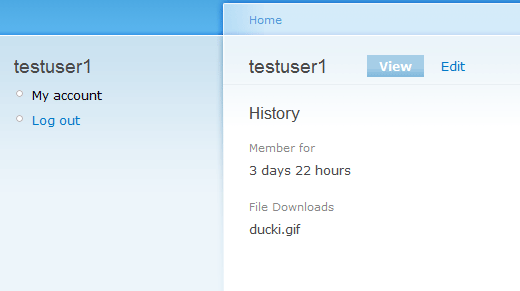

Drupal screenshot

Text resizing with JavaScript

<!DOCTYPE HTML PUBLIC "-//W3C//DTD HTML 4.0 Transitional//EN">
<HTML>
 <HEAD>
<script>

function init() {

  if($('container'))
    textSize.init();
}


var textSize = {
  small:  '80%',
  medium: '100%',
  large:  '120%',
  
  init: function() {
    var small_text  = $('small_text');
    var medium_text = $('medium_text');
    var large_text  = $('large_text');
    var container   = $('container');
    
    var textSizeCookie     = readCookie('textSize');
    var textSizeCookieName = readCookie('textSizeName');
    if(textSizeCookie && textSizeCookieName) {
      container.style.fontSize = textSizeCookie;
      textSize.resetClassNames();
      eval(textSizeCookieName + '_text').className = 'current';
    }
    
    small_text.onclick = function() {
      textSize.resetClassNames();
      this.className = 'current';
      createCookie('textSize', textSize.small, 14);
      createCookie('textSizeName', 'small', 14);
      container.style.fontSize = textSize.small;
      $('header').style.fontSize = '11px';
    }
    medium_text.onclick = function() {
      textSize.resetClassNames();
      this.className = 'current';
      createCookie('textSize', textSize.medium, 14);
      createCookie('textSizeName', 'medium', 14);
      container.style.fontSize = textSize.medium;
      $('header').style.fontSize = '11px';
    }
    large_text.onclick = function() {
      textSize.resetClassNames();
      this.className = 'current';
      createCookie('textSize', textSize.large, 14);
      createCookie('textSizeName', 'large', 14);
      container.style.fontSize = textSize.large;
      $('header').style.fontSize = '11px';
    }
  },
  
  resetClassNames: function() {
    $('small_text').className  = '';
    $('medium_text').className = '';
    $('large_text').className  = '';
  }
};

function $(element_id) {
  var element = document.getElementById(element_id);
  return (element == null) ? (false) : (element);
}


function createCookie(name, value, days) {
  if (days) {
    var date = new Date();
    date.setTime(date.getTime() + (days*24*60*60*1000));
    var expires = '; expires=' + date.toGMTString();
  }
  else var expires = '';
  document.cookie = name + '=' + value + expires + '; path=/';
}

function readCookie(name) {
  var nameEQ = name + "=";
  var ca = document.cookie.split(';');
  for(var i=0;i < ca.length;i++) {
    var c = ca[i];
    while (c.charAt(0)==' ') c = c.substring(1,c.length);
    if (c.indexOf(nameEQ) == 0) return c.substring(nameEQ.length,c.length);
  }
  return null;
}

function eraseCookie(name) {
  createCookie(name, '', -1);
}


if (document.addEventListener) {
  document.addEventListener("DOMContentLoaded", init, false);
}
/* for Internet Explorer */
/*@cc_on @*/
/*@if (@_win32)
  document.write("<script id=__ie_onload defer src=javascript:void(0)></script>");
  var script = document.getElementById("__ie_onload");
  script.onreadystatechange = function() {
    if (this.readyState == "complete") {
      init(); // call the onload handler
    }
  };
/*@end @*/
/* for Safari */
if (/WebKit/i.test(navigator.userAgent)) { // sniff
  var _timer = setInterval(function() {
    if (/loaded|complete/.test(document.readyState)) {
      init(); // call the onload handler
    }
  }, 10);
}
/* for other browsers */
window.onload = init;


</script>
 </HEAD>

 <BODY>
      <p id="accessibility">
        
         Text Size: 
         <a href="#" id="small_text" class="current">S</a> 
         <a href="#" id="medium_text">M</a> 
         <a href="#" id="large_text">L</a>

    </p>
    <div id="container">
<p>Text example</p>
</div>
 </BODY>
</HTML>