I know it’s stupid and straightforward but I’m going to write it down for my own reference:
mv foldername/* ./
Will move the files from a folder into the same (current) directory.

I know it’s stupid and straightforward but I’m going to write it down for my own reference:
mv foldername/* ./
Will move the files from a folder into the same (current) directory.
Text auto-complete: http://devthought.com/textboxlist-meets-autocompletion/
Links from Smashing Mag:
http://www.smashingmagazine.com/2008/09/11/75-really-useful-javascript-techniques/
http://www.smashingmagazine.com/2009/02/08/50-extremely-useful-javascript-tools/
http://www.smashingmagazine.com/2008/09/16/jquery-examples-and-best-practices/
This message shows up on secure pages and sometimes it’s really hard to find what’s causing it.
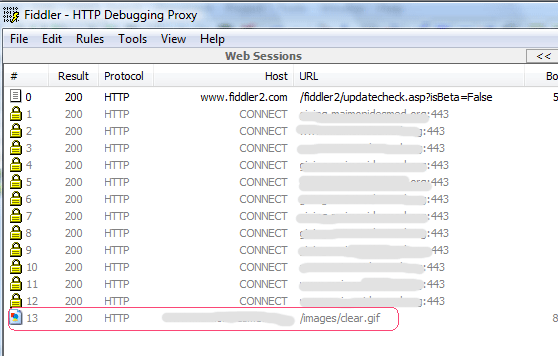
Since your page is secure, all the external files, including CSS files, Javascript include files and images need to be linked from secure https pages in order for IE7 to load your page without errors. The Fiddler tool helps identify which images/files are not being linked from https.
Once you install it, just run it and open the page you want to test in a browser. Here’s my screenshot that found that offending image in no time:
Ryan Singer, 37 signals
The future of web app interface design.
Ryan only talked about 2 problems:
1) disconnect between designers and developers
The usual process that 90% of the companies are using is separating designer from front end developers from developers.
(there supposed to be a diagram here, i might add later)
But the way it should be:
(another diagram)
Instead of having 3 separate groups of people working behind the walls, Ryan suggesting having designers be reponsible for the front layer – the “view” in the MVC system. Give the designers access to the SVN repository and let them make the changes. That takes the load off the developers and also improves the process, saves tons of time.
2) designers don’t explain their decisions.
Another example Ryan showed is the link list for one of the basecamp screens. (add a person, add a project, import contacts, export contacts) He showed how he isolated the most popular action (“add a person”) and made a prominent button for it. He explained that 70% of time people only use this action. Then under this button he added “Add a project” because it’s similar, but he make it a simple link, so it doesn’t stand out that much but still can be easily found.
The other two links he placed a bit lower on the page and made them just links, not buttons. He showed us exactly how to justify our design choices.
Great post on Ryan’s presentation from SwissMiss
Hellman Curtis showed us a great video of a poster designer, and the main line was “” to not be afraid, use everything you have in your design and let it speak, tell the truth
Dan Mall
The Experience layer
Dan gave a great talk about We have to think not only about functional and pretty sites but also about what and how users feel with they visit the websites.
Example: google maps for users with no javascript still works.
Dan was suggesting giving the users the experience based on their browsers ability to handle it. For example, use sIFR for those with flash installed.
Example URLs: responsibilityproject.com – interactive widget at the bottom of the page, for people with Flash the widget is slightly tilted, as designer intended it to be (they built it similar to sIFR) but for those without it, it would just be horizontal and it doesn’t take away any of the functionality, only experience.
winter.tnvacation.com – it’s snowing on the page, that that enhances the user experience for those with JS enabled.
Dan recommended books by Donald Norman “Design of everyday things”
Paul Boag
Educating clients to say Yes
This presentation hit it home for everyone in the audience. First of all, Paul is an excellent public speaker, he combines humor, examples, great speech organization and slides and plus his british accent just makes people listen to him, it seems! The most popular slide of the presentation was a photo of Obama smiling with the words “Yes we can” above him. There was a round of applause from the audience and Paul goes “If i knew people would like this picture so much i would just stick this guy in different settings into the whole presentation and call it a day”. And next slide he shows is Bob the builder next to Obama!
Anyways, why do we all have this difficult clients we hate and can’t seem to come to terms with them?
Because we have a wrong client relationship with them.
what we need to do:
– be the expert
– have a methodology that worked in the past / for other clients and show it
– reassure the client
– information gathering – get all the possible info from the client
– justify your decisions – based on the info that client provided or refer other third party experts
– be positive, to any client idea, even if it sucks, instead of saying “i hate this” say “Yes, but if we do it this way, alternatively we can get X, Y and Z working better”
– get clients involved in the process, show them the progress little by little, this way they will feel the ownership and that they were the one making decisions. Do this instead of surprising them with an end result.
Do kickoff meetings.
1) Focus on problems, understand why clients want to do it this way, for example if they want to place a huge button at the top of the page ask why, and see if that really solves their problem
2) Focus on business, not details
3) Focus on users: it moves the client away from personal opinion (instead of “I don’t like” it should be “Our users don’t like”). in the emails, don’t ask “Let me know what you think about this”, ask “How do you think your users will react to this”
Manage clients’ feedback. To minimize politics, instead of meetings with a “board” try to do one-on-one meetings, especially with people with “alpha-male” attitude, because they will be the one swaying the popular vote (“sheep mentality”). Meet with those people face to face and again try to understand their problems.
How to fix problems.
1) existing clients – be positive and proactive
2) no clue clients – reassure them, be the expert
3) micromanagers – refocus them on their role, focus on problems, not solutions, refer back to previous agreements
4) marketeers – explain differences between print design and web, talk their language “call to action”, ” selling point”
Also from SwissMiss, a better summary of Paul’s speech
Karl Swedberg, Javascript libraries
Ok, all of the people i chatted with agreed that this was sort of a boring presentation. The presenter, Karl Swedberg, is super smart, but he went into much technical detail and his presentation seemed dry and long. He showed different JS libraries and some examples, but I’d rather have him explain why he likes this one over this one, what it takes to learn them and some demos of the best use of Ajax on the web.
Update: I did a blog search on FOWD and found that Karl wrote up his own post about the speech he gave at FOWD and how he’d do it differently. You just have to admire his honesty – I do, since I know how hard it can be to give a speech in front of people (thousands of people in this case) from my Toastmasters experience. Great post!
Mike Kus – Whatever happened to the art in design.
Mike’s presentation was excellent. He’s a new member of Carsonified team and worked in both print and web. At the end of the presentation he gave everyone a small “cheat sheet’ with his ideas and hand-drawings!
So the summary goes:
1) the 50% thing – remember that the pixels are only 50% of your design – weave the story into your websites, that will make users think
2) preparation
3) get inspired – listen to some music, get totally consumed by the ideas for your project, remove all distractions
4) idea -> concept -> story
5) Ditch your mac – Mike said that you should forget about the computer and just use paper as your canvas at the very beginning
6) execution – has to be done perfectly, then the design becomes the work of art
Nicholas Felton – the OCD guy :)
this guy is an information genius, he compiled so much data into his yearly reports and presentation is just stunning. check out feltron.com
Derek Powazek
Derek talked about “Crowdsourcing” – the community web and what makes it successful
He highly recommended the “Wisdom of the crowd” book by James Surowecki
I was really busy listening to Derek (or just got lazy after lunch for taking any notes) so nothing on my notebook. But here’s the link to the PDF of Derek’s presentation (sprinkled with wonderful dog photos).
Nick La
Finding the inspiration
Ok, this guy just left everyone in the audience in awe. All of us there watched his presentation with our mouths open, this guys creativity and attention to details are just unbelievable.
He showed 2 of his work samples and explained little by little, where he got the inspiration from, and how he made those drawings.
The second part of the presentation was just finding the inspiration. What Nick does, he works out of coffee shops, where he can watch life. Everywhere he goes, he carries a camera with him and just observes the patterns. Great places for inspiration are japanese paper / card stores, shopping malls, art galleries and museums, and of course mother nature. He said everyone should 1) look into the detail 2) mix and match, don’t just copy
Panel
Last thing for the day was the Designers Vs Developers panel, moderated by Liz Danzico. On the designers side were Daniel Burka from Digg and Ryan Sims from Virb, and on the developers side were Joe Stump from Digg and Chris Lea from MediaTemple.
First part of the panel was Liz asking guys questions and second part – questions form the audience.
some good bits of advice:
– at digg they use something called “MRD”s – which is basically a doc where they put together a research on a feature, how many users would want it, what it takes to add it to the app, etc.
– front-end designers should get a bit curious and talk to developers, to see what it takes to implement their design
Photos
One of the many people I met at FOWD and afterparty was a great guy Chris, a developer. And I just found some photos of the FOWD on his Flickr page. I hope Chris you don’t mind me linking to them!
In your PHP code add the following line:
$html = eregi_replace (‘<a href=”([a-z0-9./-_ ]+.pdf)”>’, ‘<a href=”\1″ class=”pdf”>’, $html);
And in your CSS file:
a.pdf
{
background:url(../images/pdf_icon.gif) bottom right no-repeat;
padding-right:40px;
}
I’ve been looking and trying out at least 7 different search&replace programs until I found PowerGrep for Windows.
It is totally awesome, FAST and easy to use. Another program, Actual Search & Replace worked through my folder with ~250 files for at least 2 hours, and this baby is doing in less than 2 minutes! There’s tons of options such as preview your searches first and saving backup copies of your files. RegExp support is also excellent!
A runner up would be good old Search&Replace from Funduc software but it is limited to one line of code – good for small tasks.
I have thousands of HTML pages that need to be updated – I just have to swap a couple of lines. I was wondering how to do it all at once and in subdirectories as well.
Here’s what worked:
for mFile in `find . ! -type d -name ‘*.html’` do
sed -i ‘s/text1/replacement1/g’ $mFile
sed -i ‘s/text2/replacement2/g’ $mFile
sed -i ‘s/text3/replacement3/g’ $mFile
done
If most of the pages have the same custom field values and need to be updated, going through each page manually would take long time.
This can be done by running an update query directly to the database. This should be done carefully, of course.
Steps:
1) Make a backup of the database.
2) Custom fields are stored in the “wp_postmeta” table and marked with the meta keys. We need the field called “facts”, so we’ll be looking for that key.
3) Select pages that will need to have facts changed. Query:
SELECT *
FROM `wp_postmeta`
WHERE meta_key = ‘facts’
AND post_id NOT
IN ( 10, 643, 316, 532)
Note that “post_id not in” clause will exclude those posts/pages, and the custom fields won’t be updated for those pages.
4) Update query:
update `wp_postmeta` set meta_value = ‘new_meta_value_goes_here’ WHERE meta_key = ‘facts’
and post_id not in (10,643,316,532)
5) Check that everything worked fine.
This standalone sitemap generator script is really a timesaver, not only when it comes to creating sitemaps but also finding broken links and inspecting the site structure. It also keeps a log of changes – new URLs that’s been added and URLs removed from the site.
I’ve been working on an enormous site recently and wouldn’t get by without this tool – it found all broken links (about 800 of them..ugh)
This error appears when you try to submit an initial recurring transaction to PayPal’s Payflow Pro gateway.
I was puzzling over this issue for days and had no clue why it was happening. The form worked fine most of the time, and once in a while I would get this error. A similar setup for one of my other clients worked fine 100% of the time. So after some googling and code-digging I found the root of the problem: the “ProfileName” field was being dynamically generated, and if it had strange characters, like “&” (ampersand) or was too long, that would trigger the Start/Nextpaymentdate error (because the “Start” field immediately follows the “ProfileName” field in the string sent to PayPal). To fix this, make sure your “ProfileName” value is something static, like “MonthlyPayment”. That should take care of this.
 Tanya Nam